How does Lane Assist work on a Sprinter Van?
What Is Active Lane Keeping Assist on my new Sprinter Van?
Lane Keeping Assist is a driver-support system that monitors lane markings and warns the driver if the van unintentionally drifts out of its lane… and oh boy it can be annoying and in our opinion, not really safe. We’ll explain a bit more.
On higher-spec VS30 models, Active Lane Keeping Assist can also apply selective braking intervention to guide the vehicle back into its lane and if you’ve ever driven down the road on a wet or snowy day, this can just be downright dangerous.
The system operates through a combination of:
Forward-facing multifunction camera
Steering angle sensors
Electronic Stability Program (ESP)
Brake control modules
Radar sensors (Active systems)
Steering wheel vibration motor
It becomes active at approximately 37 mph (60 km/h) and above on Sprinter vans.
How does this system work on a Sprinter Van? What’s is this Black Magic?
First, vans are a bit different. Unlike passenger cars, Sprinters have some different things about them that make this system act in potentially exagerated ways:
First: Van’s have a higher center of gravity
Some or most vans have longer wheelbases
Because of height they have more crosswind sensitivity
And depending on cargo or camper build, the weight distribution can be all over the place
The system takes in a lot of data points, the Lane Keeping system continuously evaluates:
Steering input (are you drifting off course)
Accelerator position (are you still on the gas)
Brake application (are you actively braking)
Turn signal usage (are you indicating you want to turn or change lanes)
Vehicle speed (on over 60km/h and how much braking is needed depending on speed)
Yaw rate and lateral acceleration (are you drifting by wind)
What does the system do?
You might notice that the system doesn’t work when you have your turn signal on. If the van crosses a lane marking without turn signal input or driver correction there’s a few things the system will do on behalf of the driver:
The steering wheel vibrates (haptic alert).
The system waits for driver response (a couple seconds).
On Active systems, selective braking is applied to guide the van back into its lane. (this can be very scary)
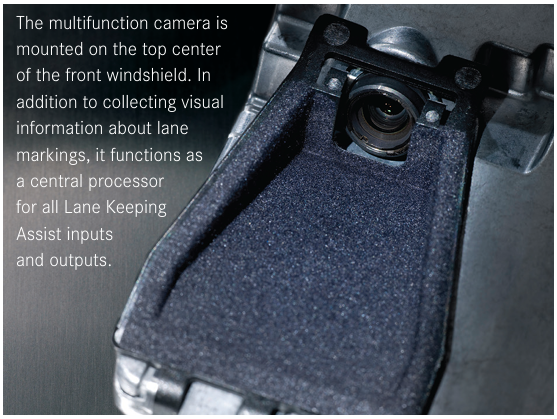
The multifunction camera acts as the central processing unit for all inputs. It literally looks at the lanes painted on the road and uses that as a guide.
Why This Matters for Upfitted Sprinters
Sprinters are rarely left stock duh… unless you’re an Amazon Prime delivery van. You’re hear reading this because you likely bought a newer VS30 van (since 2019) and take it on long trips where you drive in various conditions. But you’ll likely at some point going to mod it. Here’s the most common things we do and others likely will do that will effect the ALKA.
Suspension lifts
Larger tires
Roof racks and solar panels
Interior camper conversions (weight distribution)
Shelving and cargo systems (weight distribution up high)
Heavy rear storage or spare tire carriers (weight distribution toward far back)
Each of these mods can influence a van’s on road dynamics and thus sensor interpretation.
Weight & Balance Changes
So lets talk about the weight and balance issues. Large rear-mounted loads like cargo boxes and spare tires where you can easily put 300lbs out on the rear of the doors, or heavy camper builds will shift weight bias and affect yaw and braking response — both of which are inputs the Lane Keeping system relies on. So be aware of that. At this time we’re not aware of any way to tune the system to let it know how you have your weight distributed.
Lift kits or non-OEM alignment geometry can change steering angle calibration and camera perception of lane tracking. When you build out a van, it’s vital to upgrade the suspension so these systems don’t get triggered by vans that sway too much due to soft and overloaded stock springs, shocks and sway bars. We run the VanCompass Falcon 4.3 system and it gives us a balanced and lifted set up keeping the van planted, stable and level. It allows these sensors to work in more ideal situations then overloaded systems.
Failure Points
Windshield Cam
The multifunction camera is mounted at the top center of the windshield. One issues we’ve seen is right after windshield replacement, you need to recalibration the camera. If you don’t do this it may trigger some system failures. You might see these errors on your dash:
“Lane Keeping Assist Not Available”
“Active Lane Keeping Assist Inoperative”
Environmental Limitations
We Sprinter owners frequently travel in environments that challenge optical systems. The easiest way to get these systems to fail is driving in a snowstorm. You’ll constantly get a ‘sensor dirty’ error. Also, if you drive on muddy and dusty roads (overlanding) you’ll likely build up enough dirt and mud to block the radar and cameras.
Also, some road conditions might not trigger an alert, but might just make the system not react. Construction zones with temporary striping can trick the system. Lane markings must be visible and provide contrast for the camera to function correctly. Temporary system dropouts in poor visibility are normal and not necessarily a fault. Heavy rain or fog can also make the camera have some difficulty in tracking the lanes. Even sun glare when driving directly into the sun.
Common Lane Keeping Assist Issues in Sprinters
If you get any of these alerts, there might be some easy ways to ‘fix’ them or at least understand what was going on.
1. Temporary “Not Available” Warning
Often caused by:
Dirty windshield camera area
Ice or debris on the sensor
Environmental visibility issues
The Fix: Clean the camera area and recheck.
2. Persistent Warning at Startup
May indicate:
Blown fuse or relay fault
Steering wheel vibration motor failure
Wiring harness damage (common in high-mileage fleet vans or from rodent dammage)
Moisture contamination in radar sensors (Active models)
Camera software fault
Diagnostics should be performed using Mercedes-Benz XENTRY. Our Launch OBD reader we use was really helpful with most of these.
Relevant Fuse Circuits That Can Cause an Active Lane Keeping Assist Error (from our Sprinter 2020)
Multifunction camera (7.5A) Fuse Number: MF3– This fuse powers the main front camera that the Active Lane Keeping Assist uses to see lane markings. If this fuse is blown, you can get an Active Lane Keeping Assist Inoperative or System Impaired message.
Active Brake Assist radar sensor (5A) Fuse 9 within the F55/1-F55/8 block).– Although this is for Active Brake Assist’s radar, radar and camera sensor circuits are often linked in the driver assistance system. A failure here can also trigger multiple ADAS errors.
ESP® control unit, All-wheel drive control unit, and other (5A) feeds Fuse: MF3 15-2— These residual supply fuses support the stability and control systems that lane assist interacts with. If one of these is blown it can cascade into Assist Unavailable.
3. No Steering Wheel Vibration Warning
If lane drift occurs but no haptic feedback is felt you might have some faults:
Check steering wheel vibration motor power supply (12V signal) - steering wheel vibration motor, used for lane-keeping assist, typically receives its 12V power supply through the Steering Column Module (SCM) or directly from the Electronic Power Steering (N68) control unit. Vibration motor (often part # 218-906-28-00 or similar, used 2006-2023) If the motor fails, it may set fault code P063507 (malfunction in electric power steering).
Inspect Electronic Power Steering (N68) control unit.
Verify wiring integrity. Rodents suck.
The system depends on that vibration motor to issue initial warning before braking intervention.
4. Radar & Moisture Considerations (Active Systems)
Active Lane Keeping Assist models include radar sensors integrated into the body structure.
On cargo vans and upfitted builds:
If you remove or replace the rear bumper removal during accessory installation you can misalign radar brackets.
One issue that can happen is poor sealing on sensors, this can allow moisture intrusion.
Aftermarket metal bumpers may interfere with radar performance. There’s a lot of bumpers out there that have tested and designed their products to accommodate the OEM system and typically work flauwlessly.
Water intrusion is one of the most common causes of radar malfunction so it’s worth starting there.
Best Practices for Upfitters
If you build or modify Sprinters, consider the following:
✔ Always Recalibrate After:
Windshield replacement
Front-end collision repair
Suspension geometry changes
Steering component replacement
✔ Maintain OEM Alignment Specs
Even small deviations can affect steering angle input data.
✔ Inspect Wiring After Interior Builds
Bulkhead installs, cabinet mounting, and electrical routing can unintentionally chafe or stress factory harnesses.
✔ Protect Sensor Areas During Paint or Wrap
Heavy vinyl wrap over radar zones can degrade signal clarity.
Components:
Core components include:
Multifunction windshield camera A 247 900 25 16 (or 247-900-25-16): Multi-purpose camera, typically for models with lane assist.
Steering wheel vibration motor - part number 099-906-41-00, which is often listed simply as a "Vibration Motor"
Steering angle sensor -
ESP control module
Steering column module
Active systems add:
Radar sensor system
Yaw rate sensor
Brake system integration
The system is highly integrated — troubleshooting requires a full-vehicle diagnostic approach.